
 Stand alone GPS units are much easier to use than a PDA/GPS combo, that’s a fact. The Mio C310 is a perfect example of a well designed in-car GPS that can also be transported in your (big) pocket or backpack. Even the novice user (my grand mother) will at least be able to use it as a map. Directions are also dead simple to use and the unit got rave comments from passengers for its sleek, white ipod-esque, industrial design. We tested it for weeks before writing this review.
Design
Just like many GPS units out there, the Mio C310 is built on the Windows Mobile Platform and uses the Destinator navigation software. The C310 is a dedicated GPS unit that doesn’t have traditional Personal Digital Assistant (PDA) functions. Windows Mobile is hidden at all times to the user. Obviously, this means that you don’t use all the bits of the devices but on the other hand it makes it easier to use for the low-tech person. It is larger than a PDA and weighs 170g , that’s about the weight of a Treo 650.
Photo Galleries
Box content
Mio C310 Unit
Vehicle Mounting
All Photos
What’s in the box?
 • Mio C310 GPS Unit
• AC adapter
• Car charger
• Car mount
• Car holder
• USB cable
• Application CD, Map DVD
Specifications
GPS Receiver Channels: 20 (SiRFstarIII)
Memory: 2GB ROM, 64 MB RAM
Display: 3.5″ TFT with touch screen and 65k colors
Storage Format: SD/MMC memory expansion module
Battery: 1200 mAh Li-ion (up to 5 hours)
USB: V1.1 Weight: 6 oz (170 grams)
Dimensions (WxHxD) 4.33″ x 3.03″ x 0.78″
Road Test
 It looks very good on paper and we could not resist taking it on the road for a few trips to places that we never went to.
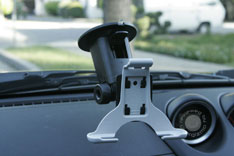
The mounting system is easy to install and holds the GPS solidly attached to the windshield. It’s hard to see on the photos, but the windshield mount and holder don’t obstruct the visibility one bit. It’s also possible to attach the car mount to the dashboard via an adhesive, but I don’t know how permanent it is and I’d rather not do it just for the review… The GPS is held in place by a white holder that’s very discreet – good thinking Mio. Now, if only the mount’s black plastic was transparent… We also tried to leave the car in direct sunlight for a few days to see if the suction cup would hold and it did (sometimes, the suction plastic softens with the heat and doesn’t stick to the glass). During sunny days, the white color of the unit made it less prone to heating than black ones (and you know how much electronics like excessive heat).
Upon powering, the unit starts to look for signals from GPS satellites. When starting “cold” (the GPS forgot where it was last) it takes less than one minute to get a “fix” (enough satellites to know your exact position on earth). If you just park your car and go shopping for 30mn, only a few seconds will be necessary to get a GPS fix. After that, you should simply see where your car is on the map. The Mio C310 comes with 2GB of pre-loaded maps (built-in memory) that contain most of the U.S cities, so odds are that there’s no need to choose a map or a region. Amazing, huh?
Routing
 Entering a route is very easy and a wizard guides you through the steps: Choose state, city, street and street number. That’s it. Searching by intersections is also possible when you don’t have the exact address. Press “go” and the GPS unit will tell you turn by turn directions as you go.
It is also possible to navigate the map (by dragging it with the finger) and simply click on a location to set it as the destination. It is very convenient and much faster than entering an address.
Maps representation
At first I was a bit thrown off by the color theme of the maps: they contain a lot of pink: an odd color for road mapping, I thought. However, after a week or so, I got used to it and now it’s just fine.
2D vs. 3D
Users have the choice between 2D or a 3D view. While the 3D seems fancier, I actually dislike it. You see a lot less of the map as the perspective crushes all the far-away details. In fact, we should not say that it’s 3D, it’s just a 2D map with some perspective (like F-zero on the super-Nintendo…). I think that real 3D will be useful with larger screens (to see the details) and much more accurate data like photo-based textures on streets and building. We’ll get there, eventually, but the amount of work is just colossal.
Re-Routing
If the user misses a turn, the GPS will recompute a route in a few seconds, faster than many competing offers. It’s particularly helpful in a big city when the next turn isn’t very far away.
Voice Prompts
Some people are not comfortable looking at the GPS too often while driving and that’s why voice directions are made for. The Mio C310 speaker is powerful enough to provide a clear sound even when driving fast on a noisy road surface. The turn directions are impeccable, but I thought that the GPS was sometimes mentioning to keep right or left without any useful purpose in the middle of the highway. It was just trying to be too smart.
Languages
Note that voice prompts are available in English, Spanish and French.
Points Of Interest
There are a ton of pre-loaded points of interest (POI). Here’s a quicklist: car service (break-down, r
ent), airport, hospital, shopping, lodging, parking, sport, fuel, city service (bank, cash, courthouse…), entertainment (movies, theme parks, casino, art…), monuments, dinning. Phew!
MP3 Player
The Mio C310 has MP3 playing capabilities. Upon the insertion of a SD card, the MP3 player will scan for songs. The unit has a standard jack stereo connector. MP3 is an interesting feature, although I think that it won’t be the defining factor for a purchase. Broadcasting music with Bluetooth would be a cool application – if Bluetooth had been integrated.
Nothing is perfect
It is very good, but not perfect. In our opinion, Mio could improve a few things:
User Interface
The zoom/unzoom interface could be better: the “plus” and “minus” buttons are too small. It’s hard to finger-click with precision while driving. Making them larger would definitely help. Using the automatic zoom is another work-around.
Connectivity
At more than $440 (street price at publishing time), this unit should feature Wi-Fi and Bluetooth (BT). Wi-Fi would be very useful for downloading maps from a free Hotspot while BT could be used to communicate with another device like a phone, to get the latest traffic information or to initiate hands-free calls.
Graphics
The graphics are decent-looking, but the scrolling and rotation of the map could be much faster. I’ve seem competing units at similar price point displaying maps more smoothly. It’s not critical, but it would improve the user experience. Customizable colors would be a nice option too.
Automatic Brightness Adjustment
wouldn’t it be cool if a light sensor was there to adjust the brightness automatically? I have never seen a GPS unit that does it so it would be unfair to hold that against the C310. I remember that some PDAs had that feature, and I don’t think that it would be much more expensive to add it.
White case
The white finish is beautiful, but it creates reflections on the windshield. White doesn’t get nearly as hot, but if a black unit could stand the heat, I’d prefer black. Aluminum would also be an alternative that I’d like to try.
Conclusion
 The Mio C310 was a pleasure to use from the start. Its 3.5” display, 2GB of pre-installed maps and ease of use makes it a very good candidate for all users from novice to experts. It is a navigation system that we can recommend without hesitation.
Starting at $325 – Street price: search now.
Update 12/5/2006: The Mio C310 has been updated with the awesome software of the Mio H610 – wow
Update 5/29: you might be interested by the Mio C220. It delivers the same experience for a much cheaper price.