Quantcast Sansa e280 Review - Sandisk Sansa e280 Review
ubergizmo

Sandisk Sansa e280 Review

Posted on Oct 10, 06 05:00 PM PDT


Sandisk Sansa e280 Review

The Sandisk Sansa e280 offers music-savvy consumers an alternative to buying music: renting it! For 6 to 10 dollars a month, you can have (real) access to more music than iTunes users could ever dream of buying. The Sansa e280 is compatible with Microsoft’s Playforsure that allows music rental. It is also obviously compatible with plain MP3 or WMA files. With 8GB of integrated (flash) memory plus an SD card expansion slot, most users should have enough room for their music/photos. I asked Alexei to review the Sensa e280 and he played with it for about a week before writing down his impressions below.

Design and Controls
sansa-e280 controlsThe Sansa e280 displays a stark contrast with the earlier Sandisk mp3 players such as the e100 series. While the older e100's feel flimsy and creaky all around, the e280 has a very solid feel and a fashionable esthetic appeal. The scratch resistant metal shell on the back is particularly interesting. It has a nice matte finish and makes the player feel sturdy and durable while holding it in your hand. Sansa's weight feels about right for its size although a bit on the heavy side. However, I did not find that bothersome at all. The player also includes a micro SD expantion slot that not only gives you more space for your music, but also turns the e280 into a card reader.

Unfortunately, what is true of the outer shell of the player is not so with the buttons. If you lightly shake the player, you can hear the wheel and the center button rattle around a bit. I do enjoy the fact that Sandisk chose to go with a mechanical wheel because it provides a better tactile response, in my opinion. However, I wished that the execution of the wheel had been better. The blue backlight looks very futuristic and cool but it is not very functional since the only thing it illuminates is the wheel while the other controls stay dark. While it is reasonably easy to remember their locations after some time using the player, I found myself poking around in the dark at first.

Software Compatibility
The included Media Converter software can be installed fairly quickly and once the Sansa e280 was connected it was immediately recognized and ready to go. The included CD came with an installer for the Rhapsody subscription music service. It would imply the two should work happily together, and indeed they did. The player was immediately recognized and I was on my way to filling it up with Rhapsody ToGo music in no time. It seems to take two to three seconds to transfer each song to the device. Album covers are automatically downloaded to the player to be displayed during playback.

The included Media Converter software is simple to use and will transfer your videos and photos to the device. It will resize all the media to the size of Sansa's screen and convert movies to the QuickTime .mov file and photos to the windows bitmap file for internal storage. Video files seem to take around 11Mb per minute and photos are around 70K each. This means you can hold between ten to twelve hours of video or 100,000 photos if you choose to do so. The device supports two USB transfer modes, Media Transfer Protocol used to transfer DRM protected media and Mass Storage Class protocol that should work across all operating systems and allow you to use the Sandisk Sansa as a portable flash drive.

Experience
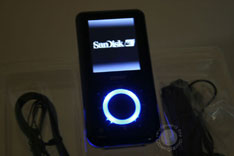
Press the power button, and about 15 seconds (fifteen?!) later the Sansa e280 is ready to use. Unlike the Zen Micro, there is no quick start mode. It's a feature that I miss after being used to the Zen's almost immediate surge of sound. The LCD display is bright and clear and the colors are very nice. The player is also quite responsive: changing tracks or fast forwarding is zippy. The track and album cover change almost immediately and the new song starts playing about 1-2 seconds later. Not everything is perfect though. The one particularly unresponsive feature on this device is the track rating system that allows you to assign a 1 through 5 star rating to any given song. It's a great idea, but once you rate a track the player freezes for what seems like a minute. Fortunately, the music keeps on playing during that time.

Talking about music, I am very pleased with the sound quality. I perceived almost no ambient noise and at about half volume on the dial, the player produced output strong enough to drive my Sennheiser HD570 headphones. Many competing players don't do as well.

Video playback was enjoyable as well, the frame rate stayed constant and the sound reproduction was good too. The included earphones are decent, but I think they are also a limiting factor. The Sansa outputs considerably better sound than the bundled unit can reproduce. After going back and forth between the Sennheisers and the earphones a few times, I think I can safely say that the user experience could be made significantly better with some better earphones.

The observed battery life is around 18-19 hours, which is close enough to what Sandisk advertises. I believe it's possible to achieve 20 hours with a moderate usage pattern. I listened to the Sansa on my way to work for about 2 hours a day and the player was able to run without a recharge for about a week and a half, which is very respectable.

Some bonus functions that come with the Sansa are the FM radio and voice recording. In fact, you can even record the radio signal to the player. It's great if you want a copy of your favorite morning talk show or that song you like but don't know the artist of. The voice recording function is very easy to use with just touch of a button.

Conclusion
Overall, I had a very pleasant experience with the Sansa e280. It has a slick design, lots of memory, good responsiveness and a terrific battery life. There are shortcomings, but in my experience they are few and far in between. It’s certainly not enough to sway me from getting one.

Add a comment


Your Comments

Comments will be published immediately if you use a Disqus, Facebook or Twitter account. Anonymous comments will be moderated.

blog comments powered by Disqus

Legacy Comments

By Jamal , 05/07/08 1:14 PM (CommentID #764705)


I just recently bought a sansa fuze everything works great except the videos i got them and tried to sync it with windows player and it didnt work

Reply | Direct Link

By samiam , 10/06/08 9:30 PM (CommentID #721257)


Yes, you have to download the media converter to do videos, unless you are using Rockbox.

Reply | Direct Link

By Anonymous , 08/06/08 9:35 AM (CommentID #716950)


do you have to download the media converter to download movies on it?

Reply | Direct Link

By joe , 29/05/08 10:03 PM (CommentID #704318)


I have one like it.. no problems. If you do have an issue just erase the whole thing on a computer and do a 30 power/reset cycle... no issues. like it alot.

Reply | Direct Link

By samiam , 27/05/08 9:52 PM (CommentID #701392)


I bought the 2Gb refurb and am happy with it after loading Rockbox. I had some issues with the Sansa firmware. During quiet passages, the left channel would sometimes cut out and not come back on until the next song. You cannot play folders.
Cannot play Ogg Vorbis or FLAC files. Slow startup when microSD is in slot. Occasional lockups that had to be cleared by holding the power button down for about 30 seconds.
Upgrading with the latest Sansa firmware did not help. Loading Rockbox solved all of these issues and provided better sound. The same mp3 files sounded better using Rockbox compared to the Sansa firmware. Re-ripping to Ogg Vorgis provided even better sound along with a smaller file size.
Note: Luckily, my Sansa is ver 1. Rockbox does not work with Ver 2.

Reply | Direct Link

By agitated , 20/05/08 8:27 PM (CommentID #687717)


I can understand the other's frustrations. I received my e280 as a Christmas gift, but was calling the help desk before I could even get it to work. After about 2-3 phone calls I finally got things set up. Then my computer got a virus and I had to reload everything. I was able to transfer files back from my mp3 player to wmp10 with no will problem, and even create a couple new play lists. Everything seemed okay- an no viruses were present. When the battery ran out today I thought I would simply plug it in like before and charge it up. Instead, it kept popping up the autoplay message without giving me enough time to respond, plus my system no longer recognized it. When I called the tech help and told them the whole story they said it had become corrupted- HOW? Especially when it was working just fine before!?! and had not been in any further contact. I don't have the option to change to M-whatever in setting, and I've tried the hold button (plus the rewind button the help desk told me to do.) It was only on the second time I called the help desk on the same day that I got the computer to recognize it again, but before I could update anything- the computer told me to turn it off and reboot- when I did that the system no longer recognizes it no matter what I do. I can restore all my music and pics, but I have voice recordings too that cannot be replaced, nor were they saved on my home computer. I am not sure what else to do. Apparently the tech help said I can have my whole thing replaced- they question is how long until it breaks down again? I would not buy it. I have walked away more frustrated and feeling like I am on my own after reading the manual- that is less than basic- or calling for help. They try, but nothing seems to resolve the problem. I love the features, but hate the mess. Good luck to anyone else.

Reply | Direct Link

By Scott H Florance USA , 25/04/08 4:56 PM (CommentID #651998)


I want my guardian angels to materialize a tiny speck of new improved drug. I should have a chip in a vial. A chip with a nano-box on its side so one single molecule can be manisfested. Then the new drug will be studied and mass produced. Sparkling spirit biengs are put in magnetic cages at the military base in Japan. Get them free!

Reply | Direct Link

By johnny , 25/04/08 6:38 AM (CommentID #651347)


Don't buy this device!!!! keep reading the reviews. More people hate this than love it.

Reply | Direct Link

By Johnny , 25/04/08 6:36 AM (CommentID #651344)


What a piece of CRAP this e280 is. I have the 8GB device. First none of my computers would recognize it, then I found the hack where if you hold the button while plugging it in..that worked once.

Now I have songs loaded on it, and it froze up on me "refreshing Database". Ok power it off and back on. that's done.

Then it would not power on. I had to hold down the power button, and flip the "Hold" button on and off several times before it finnally came back on.

I see posts here about MTP and USB mode...Mine does not even give me that option from the settings.

And the latest? None of my computers will recognize it again.

Oh, and it won't take a charge. So I'm at half battery power, and I can't use this thing.

I plug it in USB, and the battery has the little lightning bolt...for about 30 seconds, then the charge indicator goes away. I leave it plugged in for hours...no charge.

Of course i'm beyond my 30 days to return this junk pile -

Ok maybe i'm being negative also. But i expected this $100 device to work. Maybe my expectations are too high.

Reply | Direct Link

By Talia , 18/04/08 6:36 PM (CommentID #639629)


i have a sansae280 and its pretty good.
but the only problem i have is that even though i deleted tracks from it though my cmpter while it was plugged in and it shows in the cmpter files tht those files dont exist- which were my intentions. but when i scroll on the device, it still shows the artists/songs i thought i deleted and when i click on it it shows a sign saying 'Bad track'. i hate tht since i like having it organized and not having these songs [which had the titles completely wrong and all, so wanted to change it] and it freezes the sansa so i have to unscrew it and restart it.

ANY suggestions on how to make sure it doesn't show up on the device when i delete the files/ plz?

Reply | Direct Link

By babbal , 12/04/08 8:08 AM (CommentID #627149)


So... I've had my sansa e260 for about 9 months and i've loved it... but a couple days ago, i went to turn it on and the screen just went white and wouldn't show anything. I tried plugging it into the computer. It registered that something was plugged in, but it gave me an error that said the hardware was not functioning correctly. :( Is there anyway to fix it?
I loved it while i had it, but if this is a common occurance (which from reading the other comments it seems it is) i don't really want to spend another 100+ for something that won't even work a year.
If it can't be fixed, would buying an iPod be a better investment?

Reply | Direct Link

By hb20784@hotmail.com , 08/04/08 9:16 PM (CommentID #618759)


Use the wheel and go to menu called "Settings"- press the Select button and see many settings. Scroll thru until you see "USB MODE", press select button-- see 3 settings MSC, MTP, AUTODETECT. Spin wheel to mode you want. press select button.

Reply | Direct Link

By george , 24/03/08 5:28 PM (CommentID #584385)


i can't delete or format my sansa. It thinks that it's full, although there's nothing inside. I also can't load videos onto the player, it says everything was accomplished, but when i look in the player, it says it's empty.

Reply | Direct Link

By george , 24/03/08 5:25 PM (CommentID #584377)


you're supposed to load songs through a Windows media player in the Sync option, not now playing. It's recomended to have wmp 10 or higher. Get version 11, it's better. Drag the songs to the Sync place and plug in your Sansa. If it doesn't start to sync on its own, press sync now

Reply | Direct Link

By yo mama , 22/03/08 4:57 AM (CommentID #577153)


yah it uses a custom type USB cable srry no mini-usb funtion here

Reply | Direct Link

By D.F , 20/03/08 5:16 AM (CommentID #570804)


I had this player for over a year. I loved it as it has alot of functions that other players have not. I found it easy navigate and tactile so i could forward songs and change volume while in my pocket. I also used it to hook up to my TV speakers through my xbox.

Thats was all great untill I bought a 2gb micro sd card to boost the capacity (the e280 actually only give 7.3gb storage if even). Irritating enough because it trebles the boot time to refresh the database each time but after a short while when turning the player on it just froze with red and white diagonal stripes across the screen. I treated it well and it never got wet or was dropped. Pretty pissed off. The device clearly has alot of bugs, next time ill go for a more established and better made mp3 player.

Reply | Direct Link

By one mad person ! , 08/03/08 8:43 AM (CommentID #542921)


ok so ive had my e280 for over a year now and yea mine went through that freezing crap at about 2 weeks but i just knocked the piss outta it and it worked :) but now over time some of my music files start saying bad track so i deleted everything under my music file, except two files that it wont delete but they have no music, and when i turned it back on it says i have 161 song and its been sitting there saying "Bad Track" for eever and ever .... and nothing will make it stop ... wth do i do .....

Reply | Direct Link

By Lindsey , 23/02/08 9:53 PM (CommentID #506633)


OKKK !!!!! So I got my Sansa e280 about 2 hours ago ... I got it on , i was excited .. never owned a MP3 player before & i heard this is the best around ... I plug in the USB in the computer .. I go to my documents click the file for my Sansa ... I open MY MUSIC FILES .. and i drag my aaliyah song and drop it into my music file for my Sansa ... once im done .. it says REFRESHING DATABASE ... and it never even refreshed .. it just sat there FROZE !!!! ... so i finally just turn it off .. i turn it back on .. and I go to play a song and it tells me to synchronize my sansa ? uhm !!?!?! what does that mean .. Im sorry but im PIST !! Im still sitting here messing with it .. Finally that went away .. and I go to the songs that are already loaded on my sansa and try to see if theyy even play but it says PLAY .. PAUSE than switches to the next song and keeps going through all the songs because they wont play . PLEASE SOMEONE HELP ME !!!!!!!!! electronics dont like me !!!!!!!!!!!!!!!

Reply | Direct Link

By Melody , 10/02/08 9:02 PM (CommentID #477204)


I've had some success with self-ripped mp3's being recognized. I use Exact Audio Copy through Wine, and when wine is working properly, the mp3's rip properly and so forth..and they show up with album covers and everything.

Reply | Direct Link

By Melody , 10/02/08 8:59 PM (CommentID #477200)


yes, it can be used to download podcasts. I am able to do so through Amrock (a linux based music player). I just add it to the media device...hope this helps!

Reply | Direct Link

By street lover , 04/02/08 8:30 AM (CommentID #464682)


well it sounds like your battery maby are really bad or the boot loader .. won work try chrisjs.com

Reply | Direct Link

By E.Green , 25/01/08 12:34 AM (CommentID #445887)


I've had my E280 for about a 2 months, have had a few problems, but now have hit a big one, it WONT turn on! I can plug it into the computer fine, it'l light up and say it's chargeing and it'll transfer files fine, but when after the normal amount of time it used to take it for a full charge, I unplug and try to turn it on, it WONT power up, nothing, WTH? I thank goodness bought it on sale, and only spent $119.00 CDN for it, but still thats WAY too much to just have a damm paperweight!
I'm looking at a Creative 8GB player. but for now will have to rely on my trust old 2gb IPOD. Its 3 years old and NOTHING has gone wrong with it, NOTHING. other than having to use stupid ITUNES!

Reply | Direct Link

By andrew , 14/01/08 5:55 PM (CommentID #430358)


wtf, my sansa e 280 mp3 player dont work, i was using it and then the screen went white and now it wont play anything, what do i do

Reply | Direct Link

By name 2 , 10/01/08 4:14 PM (CommentID #425086)


how do i get movies on to my sansa e280?

Reply | Direct Link

By mikenbo , 31/12/07 4:06 PM (CommentID #412925)


By the way, updating the firmware imidietly will stop it from dieing, freezing.

Reply | Direct Link

By ilikeitsimple , 31/12/07 10:14 AM (CommentID #412648)


boy are you negative. I've tried ipod, creative, rio and zune. I really like mp3s that let you retain control and not force you into their software. i find the sansa very flexible and user friendly. ipod and zune are too controlling, rio was excellent, creative OK

Reply | Direct Link

By Courtney , 28/12/07 11:05 PM (CommentID #409573)


How do you change it from MTP to MSC?

Reply | Direct Link

By Anonymous , 08/12/07 2:39 PM (CommentID #388480)


if u lost ur cd where can u download it of the internet

Reply | Direct Link

By lj , 06/12/07 12:04 AM (CommentID #385766)


I have e280, pc and mac. This player is unituitive and very limited, very buggy and by no means friendly to use when connected to a PC or Mac. Macs do not recognize it always (need to switch several times between USB modes until it recognizes it - this is due that apple doesnot support it and sandisk did nothing to make some agreement with apple and work things out). Bottom line - Itunes do not work with it, mac works with difficulties. On PC In MTP mode insists to work with WMP library (I hate using WMP in general for anything)

It is possible to use it on PC as USB drive, but as I figured out it may not index your files always (and not show the list of files). In playing Compared to iTunes (and ipod) it doesnot fade sound from song to song. It is slow reindexing files once you have transfered your 8gb of music (takes 2-3 minutes to index). Everytime when you transfer couple of more songs it reindexes whole database. You cannot copy files between microSD and main memory. This is big minus because this will help moving files around.

It plays fine, have good battery life, its small, max volume is fairly ok but for me that is a bit hard on ears it is not always enough - there is no options to increase volume by pre-amplification. There is no balance function (this is unthinkable for any audio equipment) I do not hear at the same level on both ears - need to use special headphones.

Video is available but honestly I ask myself who will watch anything on so small screen (screen is a bit bigger than post stamp). You need to convert any photo and video by using supplied software and that only on windows PC. If you have Mac only you can forget photos and videos. There is absolutely no way to transfer such files from mac.

Additional to this, it uses some DRM functions (thats why you cannot copy files from or to microSD). It is likely that you will not be able to convert many media files you may have.

FM radio is OK, reception is questionable as it depends on headphones cable, sometimes you need to move to catch station properly. Presets are unfriendly to use (select and manage). You can set up to 20 presets.

Recording is OK. It is fairly ok to use it as voice recorder.

Plays fine, and it is easy to use once you have files on it. But, there is no enqueue function as such. You cannot preselect what you want to listen next.

Lets go further...

It doesnot have any organizer fuctions.

It has clock but that is not made as function (why they put it in at all? - except to name recordings). When I am at it, you cannot have custom named recordings all voice records are named by time. Doesnot have calendar (and it easily could) and that can be helpful function.

You can use it as USB drive to keep files but there is absolutely no functions for listing or viewing any file (except music, pictures and videos)

If you ask me if I would buy it again after having some experience with it, I would not. And I think I will not buy anything except memories from SanDisk anymore (this explains my dissatisfaction with the product).

Main Reason: non existant online support for troubleshooting. You need to relay on other user experience. This is unacceptable for reputable producer. If they do not support their product why shall you buy it?

If you think that I like iPod or other player - you are mistaken, I went through several mp3s and there is no ideal machine includes hyped iPods which have their problems. As usual industry is selling crap assuming users are stupid and serve "easy to use software" that is far from being easy to control or workaround the default functionality.

Regarding music stores: I do not care, I have about 40GB of mp3s, with 75% of music that are not available in stores at all. I do not care about buying music from online services - they culturally limited. This part I do not use - so I do not comment. Media industry thinks that only they have content that is desirable. How wrong....

Reply | Direct Link

By Dave A , 03/12/07 7:51 PM (CommentID #383441)


I Just bought two for Christmass - Wish me luck!

Reply | Direct Link

By pist >:0 , 29/11/07 4:13 PM (CommentID #379776)


i saved up all my birthday money to buy the sansa e280. i was sooo pumped! i have had it for a week and a 1/2...AND ITS FROZEN!!*&$%@#$%#

how do i get it fixt:/
please help

Reply | Direct Link

By NOB , 25/11/07 3:20 PM (CommentID #375933)


I just bought the sansa for christmas and i am not going to open it until then, I need to know if it is a good player. Tell me what you think

Reply | Direct Link

By Test , 25/11/07 2:04 AM (CommentID #375269)


Hello


Bye

Reply | Direct Link

By Test , 24/11/07 12:31 PM (CommentID #374814)


Hi


G'night

Reply | Direct Link

By steve , 17/11/07 5:46 PM (CommentID #367410)


can this mp3 hold full length movies?

Reply | Direct Link

By Gorm , 31/10/07 9:04 AM (CommentID #350138)


Hi,

Anyone know if this device supports mini-usb? From the video it seems like it uses some custom cable? I have mini-usb everywhere and will personally boycott any device that uses custom cables.

Reply | Direct Link

By KM , 01/10/07 6:39 PM (CommentID #318906)


Is There anywhere to get the Sansa e280 repaired. After 7 months of exceptional operation, it died without warning....

Reply | Direct Link

By Bowman , 01/10/07 11:52 AM (CommentID #318552)


I have found that pirated movies cant be put onto my e280 by the media converter, it says the file is corrupt. Does anyone know a way around this?

Reply | Direct Link

By Mitch , 27/09/07 8:58 PM (CommentID #314908)


wife bought the sansa 8 gig job.
froze and died 1st day, took it back and got another.
froze and died 3rd day.

this seems to be a NORMAL thing for this peice of crap to do.

it's nice when it works tho. to bad it doesn't for long.

my 4gig e240 model has been working fine for months. never really had a problem after i figured out about the compatibility issues with audio tags.

8gig sansa e280:
don't even waste money on this crap, its going back for a refund

Reply | Direct Link

By dgk , 25/09/07 7:41 AM (CommentID #312386)


It's been said a few times but I'll mention it again because folks keep asking. You do not need to use any software (windows media player, etc) to update the Sansa music.

There are two USB modes, MSC and MTP. If you set it for MTP, then your computer (Windows types) will recognize it as a Sansa 200 series and use WMP or whatever. I don't do that. I use MSC, so the computer recognizes it as a disk drive and you can do whatever you want including delete songs and copy songs. That should also work for Macs and Linux since it's just basic USB.

The Sansa does use the MP3 tags to organize the music, so make sure the MP3 files are tagged properly.

Reply | Direct Link

By brant , 21/08/07 1:45 PM (CommentID #277565)


does this mp3 player come with games on it? f anybody knows emsil me at freshas1@sbcglobal.net

Reply | Direct Link

By Sola , 15/08/07 6:07 AM (CommentID #272107)


I'll appreciate it if someone sends me the N99 Manual/Operating Instructions in English. I just bought a set with Chinese manual which I cannot read. I'm English speaking. Thank you.

Reply | Direct Link

By RJ , 09/08/07 5:30 PM (CommentID #267300)


I've now had my Sansa e280 for 2 weeks and have had no problems with it. To answer a few questions previously posted...

OS compatibility - So long as your OS supports mass storage class devices, you can move files on and off of the player. All you have to do is change the USB mode in the player from MTP to MSC. The only thing to take into consideration is that the music and playlists folder are hidden in Windows.

Sound quality - The sound is excellent with a quality bitrate mp3. The headphones that came with my Sansa were broken in 2 days because of how fragile they are but they do work well. If you're not an earbud fan like myself I would suggest some Sony MDR-G42 wraparound headphones; they work well with lots of bass without distortion and they fit comfortably.

Software - The bundled software by Arcsoft for encoding your movie files to quicktime format works well, although I wish it had support for files such as flv. So I simply use another program before letting it go into action. I don't like how the splash screen would prevent it from loading up faster so I fixed that by going into C:\Program Files\SanDisk\Sansa Media Converter\UI and renamed the file splashscreen.aui to something else.

Downside - There is only one I can think of but is not a big deal. The only files you can access on the micro SD card are mp3's. It would be nice if a firmware update was made for reading music and picture files from the card, even if I had to specifically name the directories to what the player will recognize.

------------------------------------------------------------

And now to voice my personal opinion on mp3's. I myself download mp3's by way of torrent or P2P, but mainly to sample a new artist/album beforehand. When I do find something I like, chances are I will buy it when I have the money. However, downloading does have its advantages; as said by another poster, its good for finding b-sides and rare files. Often times I can't find a CD I'm looking for in any store in reasonable distance (given I live in NYC there are thousands of potential stores) so I'm glad that I can get it online. There are also times where a CD is out of print and is much out of the price range for the typical person of middle class.

Granted downloading copyrighted music is illegal, but sometimes its the only way of obtaining art. For those of you who are enjoying Rhapsody, power to you. Do what is best for yourself.

Given my knowledge of technology, if you feel I'm a reliable source of information and would like to ask me any more questions about the Sansa, drop me an email to "rjwulf" via gmail.com and I'll shout back to ya.

Reply | Direct Link

By bill984 , 13/07/07 8:30 AM (CommentID #242420)


how the hell do you actually delete a song PERMANENTLY from this thing?

Reply | Direct Link

By Jake , 07/07/07 6:32 PM (CommentID #235245)


Uh, It says it is compatible with regular mp3's you already have. So whats the point of discussing the extra features so heavily. Torrent download your music and put it on/listen

Reply | Direct Link

By q123we , 06/07/07 11:48 AM (CommentID #233871)


I've owned this player for about a month. I think the review was fairly accurate but a tiny bit misleading about monthly subscription costs and was reflected in some of the comments. I'd like to clear this up: you don't have to pay anything per month to use this player. I've torrented most of my music and it works just fine. The one drawback that I found with this player that hasn't been mentioned from what I've seen is that the included SanDisk Converting software doesn't allow you to add or delete music tracks. They expect you to use a 3rd party software - such as Music Monkey or Windows Media Player 11. Up until now I've always vowed to stay away from Windows Media Player and haven't touched it since I installed Windows. I wish VideoLAN's VLC was compatible with this device - but whatever. So once I acclimated myself with WMP, everything worked out fine. I like the fact that I can play movies on this device too - just in case I don't like the in-flight movie.

Reply | Direct Link

By Jake , 15/06/07 3:24 PM (CommentID #207757)


I got a sansa e280 4 months ago, and it's frozen up on the 6 times. this time, though, my computer wont read it, it will not charge, and I think it deleted all of my files...

Reply | Direct Link

By Jake , 15/06/07 3:24 PM (CommentID #207756)


I got a sansa e280 4 months ago, and it's frozen up on the 6 times. this time, though, my computer wont read it, it will not charge, and I think it deleted all of my files...

Reply | Direct Link

By Greg , 29/05/07 9:14 AM (CommentID #187303)


Are there any stores that sale a replacement usb cord it is insane that Scandisk does not make replacement cords.

Reply | Direct Link

By Anonymous , 27/05/07 9:49 PM (CommentID #184775)


I wouldn't reccomend buying one of the Sansa e200 mp3 players before you think about what your getting yourself into. They are a bad decision, they seem to quit working really easily.

Reply | Direct Link

By Anonymous , 27/05/07 9:44 PM (CommentID #184772)


I have had two of these mp3 players so far, and they seem to be failing me. My first one froze up and I tried recovery mode, but things only went down hill. My next one which I'm having problems with right now is turning on and then dying, and before that the files were corrupted. Also when I try and charge up or add songs to my new player, it attomatically disconnects the USB connection.

Reply | Direct Link

By David K. , 26/05/07 1:12 PM (CommentID #183215)


I had nothing but bad experiences with mine, within 3 days of getting the first one, it fromze on me.. and over the course of the new week, it did it 3 more times, crashed once and wouldn;t load back up til the battery died, the screen blanked out me, and the device started resetting itselof everytime i pressed the back button. got a replacement, in 2 days, it froze again and the sound on it kept cutting out on me every minute..

in my opinon, a junk product.

Reply | Direct Link

By bob , 23/05/07 1:15 PM (CommentID #179026)


hello all.

i bought one of these a few weeks ago and peeled off the code on the back of the inside when i got it. i now need that code to use my warrenty. can anyone give me theirs? its the one that you need to unscrew the backplate for.

Reply | Direct Link

By JB , 15/05/07 9:23 AM (CommentID #171639)


I've read all the previous reviews, am considering one of these, understand that WinXp and Media Player 10 are required and wonder if anyone has successfully used a SanDisk Sansa e280 in Win2K. I'm not at all interested in subscription services; just loading and listening to playlists of ripped tracks from my own CD collection. Not interested in playing streams on my Mp3 player. Any users currently using other desktop music players/organizers within Win2k?

Reply | Direct Link

By stephy , 11/05/07 9:03 AM (CommentID #168049)


I bought it
and it works pretty well

except one thing...

Reply | Direct Link

By Dave Hall , 03/05/07 8:23 PM (CommentID #158366)


This device is no longer supported by Rhapsody. I was using it succesfully for about 4 months then it stoped allowing me to transfer or play songs. Rhapsodys answer sorry we only support the E280R not the E280 dispite the included flyer.

As I purchased tracks rather then the monthly fee I lost about 90USD worth of music. With no help or support from Rhapsody.

Also to answer some of the other comments. For some of the kids today who consider music out of date in weeks unlimited music for Several bucks a month (currently 12) is a darn good deal for unlimited access to however many songs they wish to listen to. Assuming they want to support the artist. I see the valuye to such options just give me the chance to buy as well.

Reply | Direct Link

By Buttercup , 27/04/07 11:00 AM (CommentID #152179)


I was really pleased with my purchase of the Sansa e280.... until just a mere 4 weeks after I bought it, it died on me! It completely froze up and I was unable to reboot it. It became totally unresponsive - unsalvagable.

I fully take onboard the praise that it has received, it's a good looking, sleek little thing - that's true and it's the IPOD's nearest competitor etc, but I wish now that I had paid more attention to the comments from people who had experienced similar problems as this freeze and die thing appears to be a very common fault.

I really wish I had bought an IPOD, and now 3 days before I go on holiday, I am stuck with this useless piece of rubbish!

Reply | Direct Link

By Bucky , 20/04/07 10:27 PM (CommentID #145215)


who in the world would pay for mp3's?

Reply | Direct Link

By Anon Indy , 15/04/07 4:05 AM (CommentID #141304)


Yes, there is a way to get any sort of file on the device - look for the MTP vs. MSC mode in the manual for details.

Reply | Direct Link

By person , 04/04/07 4:37 PM (CommentID #130230)


so...is there no way to get pirated music on the player?

Reply | Direct Link

By Terry , 02/04/07 5:39 AM (CommentID #127732)


I rent and buy... It is the best of both worlds. I listen to the newest songs and then buy them slowly if I still like them after listening to them several times. I also have used a couple of the song sharing sites... It is hit or miss on the quality of the songs. With the subscription or purchase of songs you are purchasing consistant and legal quality. It you want free and borderline inconsistent quality, then pirate... If you want consistent quality, then rent or purchase.

Reply | Direct Link

By shmuel green , 28/03/07 10:48 PM (CommentID #125152)


can this unit be used to download podcasts. Costco's concierge service said no but I am skeptical . Thanks

Reply | Direct Link

By Human , 03/02/07 8:19 PM (CommentID #094980)


When I pirate music (using Limewire or some other website), I usually just download songs to: see if I like that band, get b-sides, covers, live tracks or rarities, or if I only like a few songs by that band. Other than that, I buy the CD, because I like to support the artists I listen to, and I like owning CDs.

If a person gets a 60 or 80 gig iPod Video, it's mainly for videos, movies, and games. I tried Napster To Go for two months (came with my mp3 player), and I didn't like the whole system. You can either listen to your music on your computer, or your mp3 player, not anywhere else. I suppose if you had the Creative Vision M 60 gig, you could take Napster/Rhapsody/Yahoo!'s entire catalog, and leave it on your player.

Reply | Direct Link

By werewolf , 04/01/07 10:49 AM (CommentID #081086)


The review was unclear on this, so I'll ask: has anyone with one of these players actually used it with a non-Windows OS [say... Linux] and been successful at copying music or other files to/from the player and have it recognize them? As previous posters, have a large library of self-ripped mp3's and no interest in the subscription services or their software.

Reply | Direct Link

By david , 02/01/07 10:56 PM (CommentID #080400)


i just got the sansa for xmas also. i really appreciate it. b/c while you can subscribe to rhapsody, you can also ditch the subscription but still buy the music and have it "forever". but i personally get tired of music after a few months and end up never listening to a lot of music i have. i started downloading mp3's when napster first came out; now i'm tired of just about 80% of 6gb of music.

with rhapsody i KNOW i will be downloading more than 15 songs/month. so after 15 songs the subscription pays for itself. and with the Rhapsody Channels i can listen to streaming audio and click add song as i hear songs i like. if i really like it and want to have it "forever" i can always buy it for between $.44 and $.89...

so i can't really imagine why i would want to commit to itunes, when if i want to hear the whole song, i have to buy it.

also, the only time i listen to music is on my computer, my car, my mp3 player, and my home stereo. and of course their are accessories that allow me to easily connect my mp3 player to car and home stereo (fm transmitter, direct cable connection).

rhapsody offers "channels" similar to F.M. channels. everytime you connect the sansa it changes the channel's song lineup. if you like a song you hear, you can add it to your library, if you don't like it ban it from the channel and it will never be played again.

on top of all those points, i am on my computer for very long periods of time, and a rhapsody subscription allows me to listen to streaming music the WHOLE time. i freaking love it.

one last point, the F.M. tuner!! sometimes i get tired of listening to my MP3s and I can tune into the F.M. station... to listen to morning shows, sports games, NPR, talk shows...

all in all i think the sansa can be the next generation MP3 player offering more than just MP3 downloads. i would love to see apple get pushed aside!!

Reply | Direct Link

By Sarah , 30/12/06 6:14 PM (CommentID #078666)


i just got my sansa e280 for christmas and had it over a week. i think its fantastic much better than the ipod. It's stylish and has Video and music quailty is very good with a very easy to use menu and controls. however i don't agree with the renting of songs especially since you can download them from the internet for around $2 and then you have it forever....!! overall i'm very happy with sansa e280 it has everything you need for a MP3

Reply | Direct Link

By Matt , 26/12/06 6:29 PM (CommentID #077622)


Renting music seems the same as paying for Cable TV or satellite (which is pretty logical and inexpensive for what you get, actually)....

There is so much cool new music out there (if you know what to look for), that you will not miss those old Milli Vanilli songs that were so hot five years ago. You'll always have new stuff to listen to, and limited time to listen to it, so this prevents guys like me from "pack-ratting" old tunes (I have 700+ CDs, of which I regularly listen to about 20).

Just my two cents.

Reply | Direct Link

By Rick , 16/11/06 4:49 PM (CommentID #065120)


One more thing in response to another post I just read. I totally agree with the original review with regards to the audio quality with the exception of the included headphones. I like the sound of the included headphones but don't appreciate the style of headphone because they are uncomfortable. I have a couple different sets that plug deep into the ear canal and they sound about the same but feel much better.

So... The audio quality of this player in my humble opinion is quite good. No complaints.. :D

Reply | Direct Link

By Rick , 16/11/06 4:45 PM (CommentID #065119)


It seems funny to me that the review was mostly about the player and these comments seem to center around music rental. Allow me to continue ranting... There is one option that people seem to continuously leave out when talking about portable digital music. Is there something wrong with purchasing the CD and ripping the songs so you can have the mp3 to distribute between several different players? Having said that...

I Have had the e270 (6GB version) for two months now and was happy with most of it until I wanted to change the music in the player. Windows Media Player is the only music manager I found useful (the instructions that come with the player really don't help much).

I deleted the songs out of the playlists I wanted to change but after synchronizing with the player the songs were still on the player so I was unable to add more music. I find out later this is 'supposed' to be the correct thing to do but had to delete the songs directly from the player.

Now everytime I add music to the player the mp3 tags seem to get left out and I have no playlists anymore. I will say this again... The included instructions are terrible and don't address any of these items so I have been mostly stabbing in the dark blindly to overcome the issues I keep encountering.

Last night I add a couple short movies to the player after hours of not finding what I wanted with regards to the mp3 problems. Whem I disconnected the player it rebooted as it normally does and never turned on again. The logo came up and froze; permanently. After it was on and frozen all night I turned it back on with the USB cable attached and with the slow email assistance of SanDisk was able to determine the player now has to be returned to SanDisk. This was following only a day of troubleshooting so I guess you could say I am not a happy camper.

I notice the original review mentions Creative so I should be ok to say something about my Zen player here too. I have almost had it for three years and I have never had to send it to Creative. It has a hard drive so it has to be handled much more carefully but still has no failures in its history. Funny thing is it has been upgraded from 20GB to 60GB so I could never hope to send it to them anyway...

Now the good things.. I agree with the battery life. I travel often and sometimes need music for a very long time. I can remember not even getting a whole work day out of the Zen player where this player can almost pull two work days off.

Even though the email version of the support I received was slow, it was accurate and it is unfortunate I have to send the player away to be replaced/repaired. I almost thought I would get away with wiping some portion of memory away and reloading it as I have done in the past with the Zen with the hard drive replacement.

The problem seems to be some corruption in the firmware which IMHO should have some bootstrap loader in ROM that can always load firmware so this problem can't happen but I guess I wasn't consulted when it was in design then was I? hehehe

I do like the player over all; just a little miffed at the problems I just encountered and will be a bit cautious in the future considering another one. I was hoping to get my wife one for her birthday; now I find myself wondering if this is the right thing to do...

I also am just finding out about the mini card reader... Why isn't the documentation a bit easier? This isn't right....

Reply | Direct Link

By Lars , 13/11/06 2:56 PM (CommentID #064121)


Can anybody comment further on the audio quality of this device. I have seen VERY mixed reviews, some saying very poor, some saying very good, who can i believe?

Reply | Direct Link

By mitch , 11/11/06 8:52 AM (CommentID #063270)


i use napster to go and "renting' music in my oppinion is very good u get to choose all the music u want and u get to keep it as long as u are paying for the service. FYI pirating music is indeed illegal and the fine is 500,000 per song so just use a subscription

Reply | Direct Link

By John B , 26/10/06 6:10 AM (CommentID #057652)


I bought an e280 to replace my iRiver iHP-140. I'm sorry that I purchased the Sansa and have continued to use my iRiver. The Sansa only offers approximately half of the functionality of the iRiver.

I would not purchase the SanDisk product.

Reply | Direct Link

By Ken , 19/10/06 7:23 AM (CommentID #055831)


Boxwave.com has a replacement cord for the unit, but the quality is ridiculously bad. The original cord cannot be bought from Sandisk. My puppy ate mine so replacing it was not pleasant at all. I think it's ridiculous for Sandisk not to have replacement cords! Has anyone figured out how to read test files with the unit?

Reply | Direct Link

By Anonymous , 12/10/06 11:47 AM (CommentID #053924)


Jay, I agree, it's about one's personal taste and I think that a lot of people are OK with renting their music.

Most people can't afford to fill a 60GB iPod with songs priced at $1. However, by renting, you have can really using all that diskspace.

It all comes down at: how much do people spend on music. Renting will work very well for some users.

Reply | Direct Link

By Jay , 12/10/06 9:54 AM (CommentID #053909)


You cannot compare renting a dvd to renting music.. A dvd you watch normally ONCE every few years.. a song you like you listen to every day.. and let's not forget that a rented dvd, if you really like it, can always be copied.

Music is not about more choice, it's about YOUR personal taste.. and expression of your self..

Reply | Direct Link

By Anonymous , 10/10/06 5:42 PM (CommentID #053480)


Would you like your kids to inherit the songs? People rent DVDs for more than that every month, so why not rent music.

Obviously, downloading (pirated) songs for free can't be beaten, but it's also illegal :)

More choice vs. buying YES. More choice versus pirating, possibly. Cheaper than pirating? Nope.

Reply | Direct Link

By Anonymous , 10/10/06 5:19 PM (CommentID #053476)


6 to 10 dollars a month.. so 72 to 120 dollars a year.. for the rest of your life..or until the company goes bankrupt.. and then you have nothing..
But since most people are downloading songs for free, why would they now start to pay a monthly fee for having those same songs? More convenient, yes, but you're only renting the song.. more fun or more choice? certainly not.

Reply | Direct Link

By JA , 10/10/06 7:18 AM (CommentID #053389)


I agree with most of this review, however I would like to point out one fatal flaw this player has - the fast forward/rewind is terrible on large audio files. Something like an audiobook in wma or mp3 would never work because the more the player fast forwards, the slower it gets. It would take literally hours of holding the fast forward button or spinning the wheel to get where you wanted.

Reply | Direct Link


Featured Posts


Top Stories


Advertisement